Section message
A section message is used to alert users to a particular section of the screen.Usage
Section messages communicate important information in a section of a screen. Section messages are persistent, but can disappear when the person takes action or resolves the situation.
Use section messages let people know when:
- taking a particular action may have potentially destructive consequences.
- they need to take action to keep moving through an experience.
- there are connectivity or authentication issues.
Parts
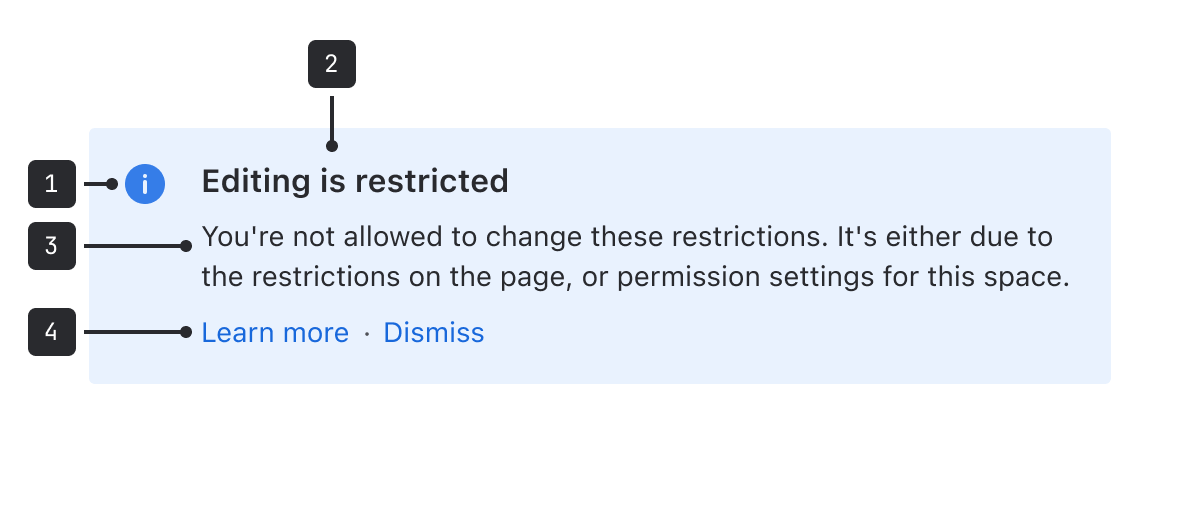
- Icon and background color: These colors are set to the default that matches the message type. For example, warning messages are yellow with an exclamation point icon.
- Title (optional): Titles should clearly indicate the purpose of the message.
- Description: Describe the issue and any action the person needs to take to resolve it, if applicable. The message area will grow along with the length of the description but should be as succinct as possible.
- Actions (optional): One or more links that enable people to act on the section message content.
Accessibility
- Don't rely on color alone to convey the severity of the message. Ensure that the accompanying text clearly explains when the message is a warning or error.
- For warning and error messages, always try to avoid dead ends and provide people with information on how to proceed to resolve the issue.
- Ensure that links accurately describe the destination. For example, say "About user permissions" rather than "Learn more".
Content guidelines
- Titles should clearly describe the issue or reason for the message.
- Description text should be clear, concise, empathetic, and informative.
- Use active verbs to guide people on any actions they need to take.
- Avoid blame and accept if something is our fault. For example, "we're having trouble connecting" rather than "you're having connection issues."
Data Center apps
For all new features, we recommend using Atlassian Design System and other Atlaskit components, (opens new window). For existing code, you can continue to use Atlassian User Interface (AUI), (opens new window).
- For messages with information affecting the whole site, use a banner.
- For messages that appear after an event takes place, use a flag.
- For smaller contextual messages about a specific part of the UI, use an inline message.