Avatar
An avatar is a visual representation of a user or entity.Usage
An avatar represents a user or entity in an app (such as a project, repository, or space). They're often combined with status or presence indicators to give more context. Users generally upload their own image. If they haven't uploaded an image, the avatar will use a default image.
Check you’re using the right avatar shape, size, and features for your use case:
- Use circle avatars to represent a person.
- Use hexagon avatars to represent an agent entity, such as Rovodev or other AI-powered entities.
- Use square avatars to represent other entities, such as a project, repository or space.
- Add a presence indicator to show a user's online availability. For example: available, away, focused, or busy.
- Add a status icon to show additional contextual information about the user. For example: an approved checkmark, to signal when a user has approved a piece of work.
- For more on sizing, see the avatar sizing examples.
Parts
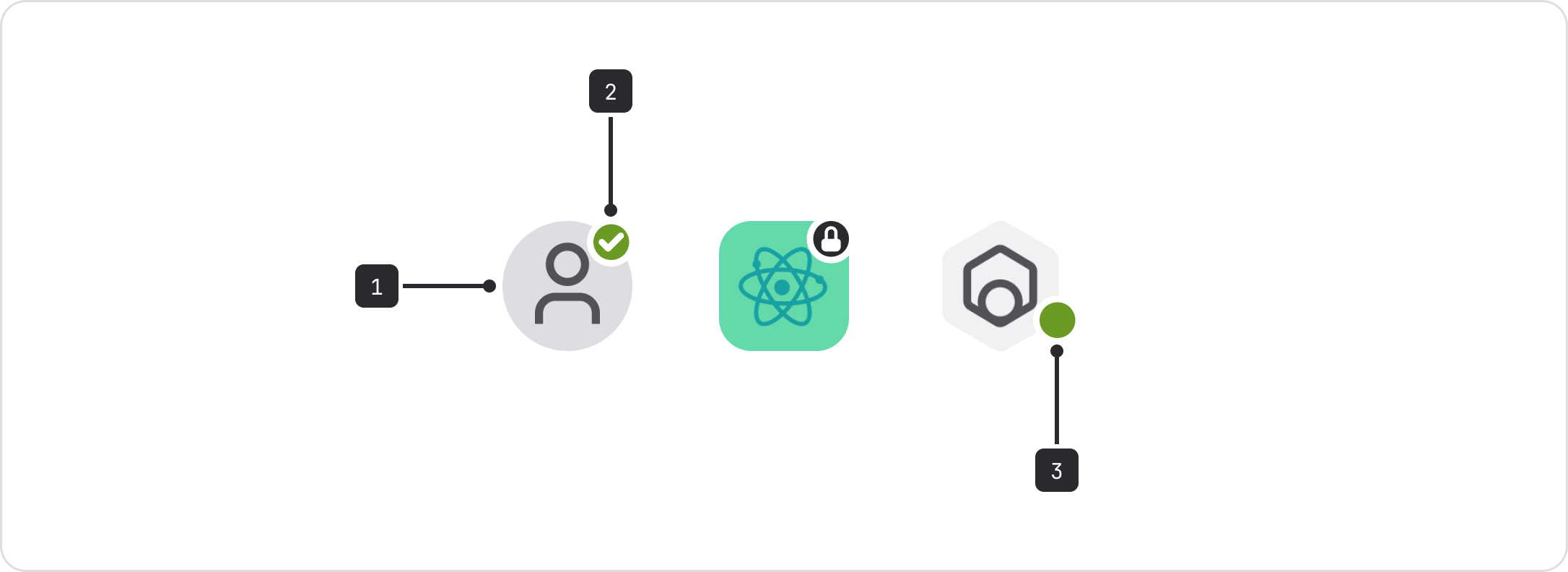
The avatar component is made of three parts: Body, status, and presence.
- Body: The image representing the user or entity. This can be round, square, or hexagonal.
- Status: An icon that displays the avatar’s status. This is positioned at the top right of the avatar component.
- Presence: Indicates if a user is available, away, focused, or busy. This is positioned at the bottom left of the avatar component.
Accessibility
- Use the
nameprop to include alternative text for screen readers. - For decorative images, remove the
nameprop or leave it empty so it will be ignored by assistive technologies. - Don't use a tooltip with an avatar when it's non-interactive or disabled. The tooltip won't work for keyboard users and screen readers.
Mobile guidelines
Tap on the avatar to reveal its details.
Data Center apps
For all new features, we recommend using Atlassian Design System and other Atlaskit components, (opens new window). For existing code, you can continue to use Atlassian User Interface (AUI), (opens new window).